
The knowledge base
How to Configure Google Chrome Start & Home page via intune
Step by step: configure the Google Chrome start page and home page on Windows 10/11 devices managed by Microsoft Intune.
Intune/How-to guide·Reading time: 1 MIN·Video length: 10 MIN
Also available in: Español · Português
Overview
We will use Settings Catalog in Microsoft Intune to deploy a custom configuration profile for Google Chrome.
Steps to Configure the Chrome Start & Home Page
Access Intune
- Go to Intune.
- Navigate to Devices > Windows > Configuration.
- Click Create > New Policy.
Set Up the Profile
- Select the Platform as Windows 10 and later.
- Choose the Profile type as Settings catalog.
- Click Create, then provide a Name and Description for the policy.
- Click Next.
Add Configuration Settings
- Click Add settings.
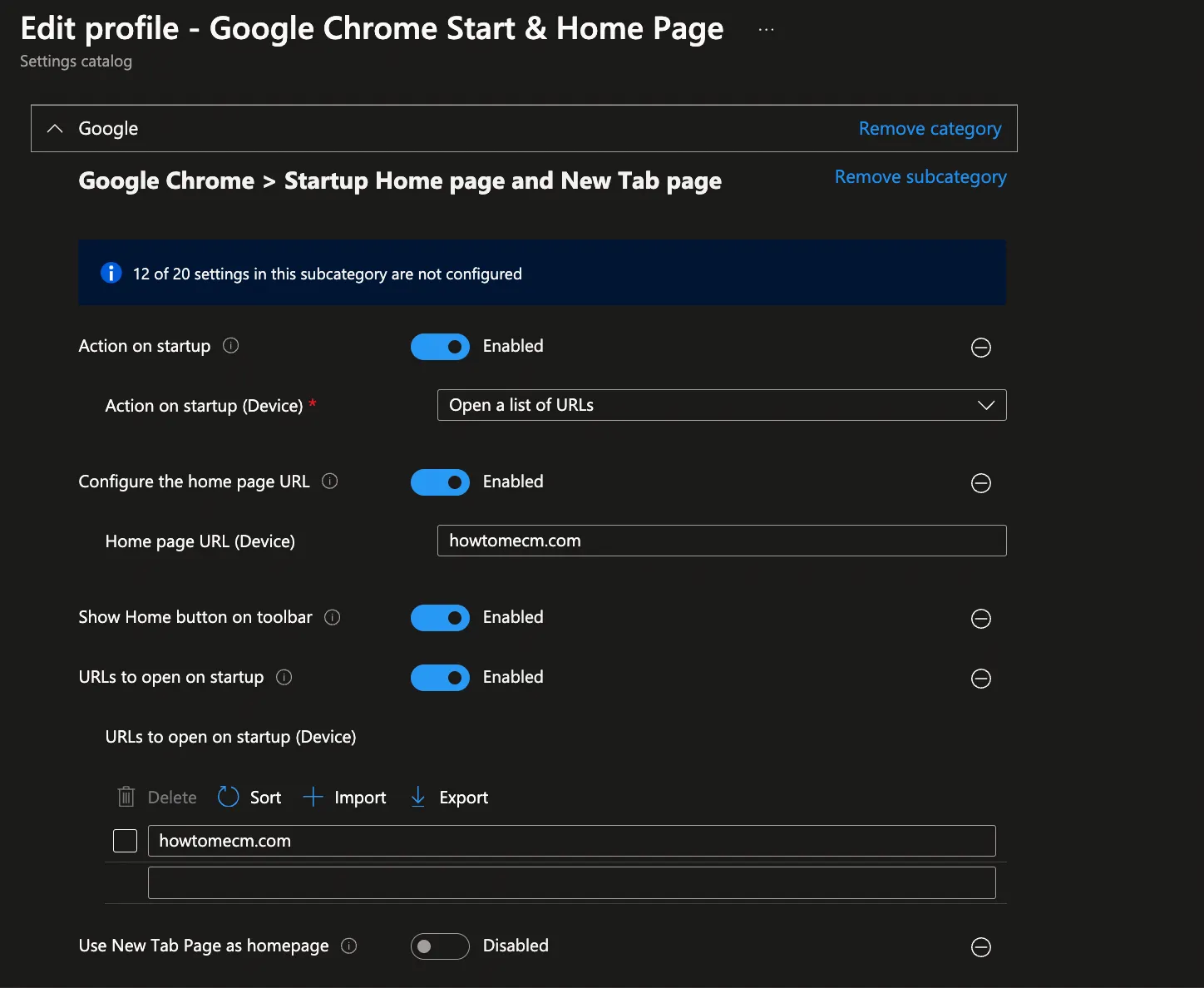
- Search for Google Chrome > Startup Home page and New Tab page.
- For this example, we’ll use the locked configuration instead of the settings with “(User)” at the end to prevent users from overriding our policy.
Configure Startup Page Settings
-
Enable the following:
-
Action on startup: Enabled
- Action on startup (Device): Open a list of URLs
-
Configure the home page URL: Enabled
- Home page URL (Device): Enter the desired URLs (e.g., https://google.com or your organization’s intranet).
-
Show Home button on toolbar: Enabled
-
URLs to open on startup: Enabled
- URLs to open on startup: Enter the desired URLs (e.g., https://google.com or your organization’s intranet).
-
Use new tab page as homepage: Disabled
-
Click Next once the settings are applied.
Set Scope Tags
Add scope tags if needed, then click Next.
Assign the Profile
Assign the configuration profile to specific user or device groups. Click Next.
Review and Create
Review the configuration summary, then click Create to finalize the setup.
Comments
Comments are hosted on YouTube for How to Configure Google Chrome Start & Home page via Intune #intune #googlechrome #startup #homepage
Signed in as
Your comment is posted to the YouTube video from your Google account, under your name. It shows here once YouTube publishes it.
Sign in with Google to like the video or post a comment on YouTube. Reading is open to everyone.
Loading comments from YouTube…
Comments are read from and written to YouTube under theYouTube Terms of Service ·Google Privacy Policy
Keep learning
Intune/How-to guide·Reading time: 3 MIN·Video length: 23 MIN
How to Configure OneDrive Known Folder Move via Intune: A Must-Have Policy for Modern Workplaces
How to configure OneDrive Known Folder Move (KFM) with Microsoft Intune so Desktop, Documents and Pictures sync to OneDrive on Windows devices.
Read article
Intune/News & analysis·Reading time: 4 MIN
WWDC 2025: Apple's Big News for Device Management (and what it means for your Intune!)
WWDC 2025 brought Liquid Glass, iOS 26 and macOS 26 Tahoe, plus device management updates that matter to IT admins who manage Apple with Intune.
Read article
Intune/News & analysis·Reading time: 3 MIN
What's New in Intune: Service Release 2505 Highlights
Discover whats new in Intune 2505: Deny rules for elevation, Linux AV exclusions, Android root detection, RBAC changes, and more cross-platform features.
Read article